In Nkapio, an invoice is the record of a sale: what a client bought, what it costs, and how much they still owe. Invoices are born at the point of sale — completing a sale creates a numbered invoice automatically, so anyone who can ring up a sale also creates invoices. This guide shows where invoices live, how to read one, and what you can do with it after the sale.
Where invoices come from
Every invoice starts as a sale. You never type one up by hand: you pick the client, add the lines — products, services, gift cards — and Nkapio turns the cart into an invoice when you finalise it, handling the totals, tax and numbering for you. The checkout itself is covered in Make a sale (POS).
Step 1 — Open the sales listing
Click Sales in the sidebar. Every finalised invoice appears with its number, client, store, date, total and payment status. Filter and sort by any column, and switch to the Drafts tab to pick up a parked sale. The cards along the top summarise today's sales, today's count, outstanding balances and open drafts at a glance.
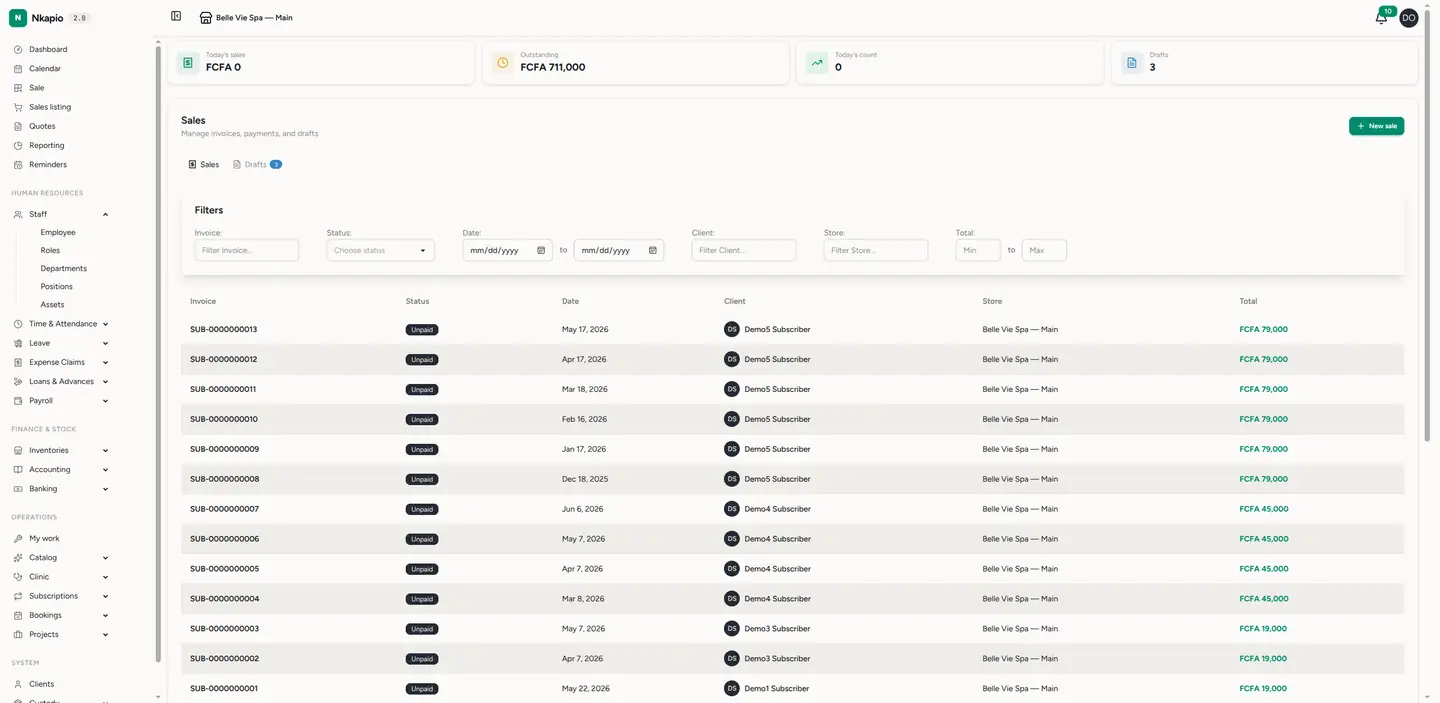
Understanding the status flow
An invoice moves through a few states:
- Draft — a parked cart that hasn't been finalised. It has no invoice number yet and lives under the Drafts tab.
- Unpaid — finalised, but nothing has been paid.
- Part-paid — some payment recorded, a balance still due.
- Completed — fully paid.
Unpaid and part-paid invoices make up your outstanding amounts; recording payments moves them toward Completed.
Step 2 — Open an invoice
Click any row to open the invoice. The header carries the number, status and date; below it you'll find the client the sale is attached to (or No client for a walk-in), the line items — each product or service with its quantity, unit price and line total — and the totals: subtotal, tax, any discount, deposit applied and the final total. A Paid and Balance due summary with a progress bar and the due date sits at the top, and the payment history appears as a timeline.
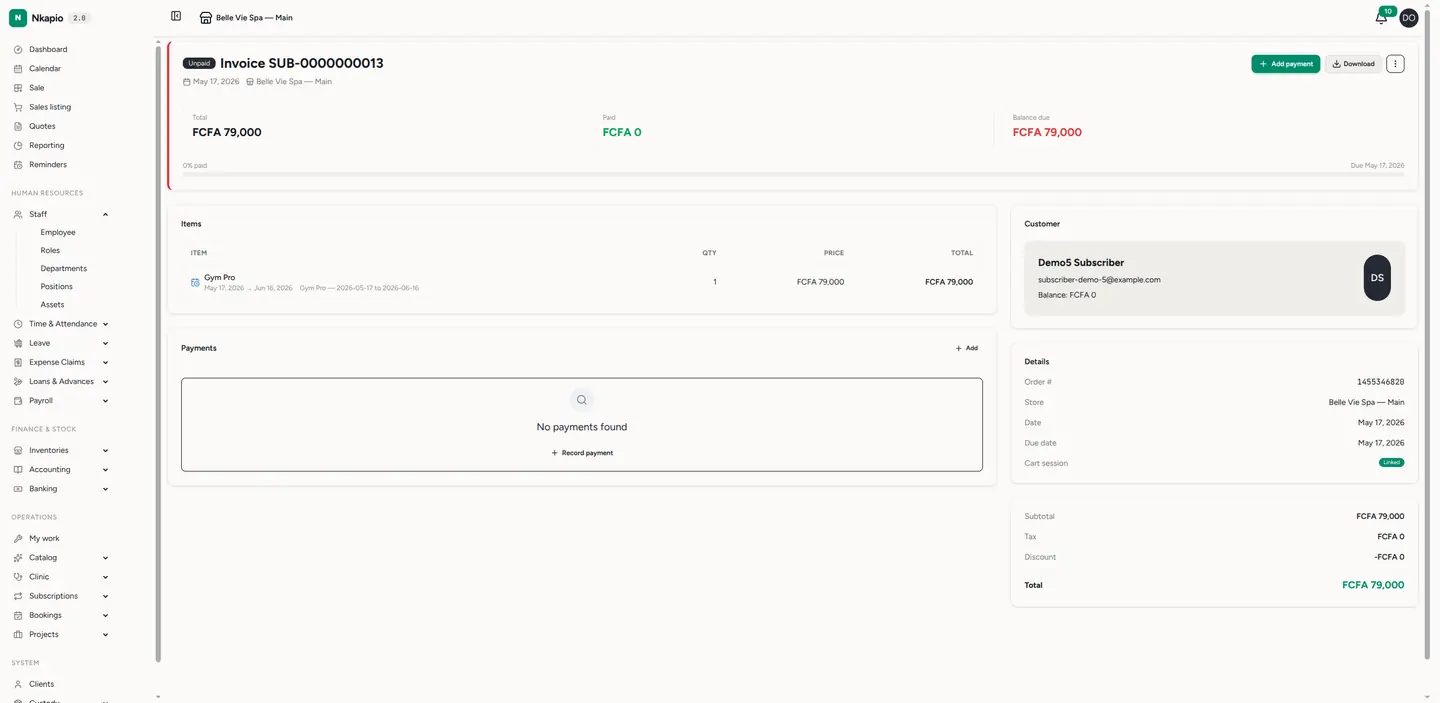
Step 3 — Download or share
Use Download for the PDF — laid out with your logo, numbering and the notes from your document settings. Send it to the client by WhatsApp or email, or print it. To change how the number and layout look, see Document templates & numbering.
Recording payments
To register money against an invoice, open it and use Add payment. Each payment shows up in the timeline and pushes the status from Unpaid toward Completed. Full details are in Record payments.
Tip: need to bill without an immediate payment? Complete the sale and skip the payment — the invoice stays Unpaid and shows up in your outstanding amounts until it's settled.
Good to know
- Editing is for drafts only. Once a sale is finalised you can no longer change its lines — the Edit button appears only while the invoice is still a draft. To correct a finalised sale, void it and ring it up again.
- Voiding restocks and refunds. Voiding a sale returns its items to stock and reverses its payments. It can't be undone, and it needs delete permission.
- Permissions. Creating a sale needs the sale permission plus read access to products and stock; adding payments and voiding are separate permissions. If a button is missing, your role probably doesn't grant that action.
- Plan limits. Your plan may cap how many invoices you can create per month; when you reach the cap, the New sale button is disabled until the next cycle or an upgrade.
FAQ
Can I invoice a client without taking payment right away? Yes — finalise the sale and skip the payment. The invoice stays Unpaid and appears in your outstanding amounts until it's settled.
Where do invoice numbers come from? They're assigned automatically when a sale is finalised, following the format in your document settings.
I don't see the Edit button — why? The invoice is no longer a draft. Finalised invoices can't be edited; void and re-create instead.